Thanks to @vivi for compiling this helpful information!
viewtopic.php?p=1332284#p1332284
How to Post Pictures on the Forum
How to Post Pictures on the Forum
There is nothing more important than this one day.

Re: How to Post Pictures on the Forum
That's one way. Keep in mind that hosting services come and go, their directory structures change, and sometimes the URL's used in forums become obsolete. There are plenty of forums with old, potentially useful threads, that are now useless because of broken links to pictures.
I'll always upload my pics directly to the Forum. It's not without its own challenges, however. I'll struggle with the challenges to ensure the permanency of the post.
Some would say that posting directly to the forum uses Spyderco resources, which come right out of Sal's pocket. That's true. Rather than go through the hassle of PayPaling him for the disk storage that I use, I contribute by continuing to buy Spyderco knives.
I'll always upload my pics directly to the Forum. It's not without its own challenges, however. I'll struggle with the challenges to ensure the permanency of the post.
Some would say that posting directly to the forum uses Spyderco resources, which come right out of Sal's pocket. That's true. Rather than go through the hassle of PayPaling him for the disk storage that I use, I contribute by continuing to buy Spyderco knives.
-
The True North

- Member
- Posts: 9
- Joined: Mon Nov 11, 2024 8:57 pm
Re: How to Post Pictures on the Forum
How do you post directly to the forum?
Re: How to Post Pictures on the Forum
Hi, The True North:
Posting directly is simple. If you're replying to a post, click on Full Editor (if you're starting a new thread, you're already in Full Editor). You'll see two tabs below the box you type your post in: Options and Attachments. Click on Attachments. Click Add Files. A dialogue box will open for you to select the image you want to upload. You'll see the file below the Add Files button once it's uploaded. Place your cursor where you want the image in your post and click Place Inline. The forum has a file size limit of 2MB per image.
Welcome to our forum!
Kristi
There is nothing more important than this one day.
-
The True North
- Member
- Posts: 9
- Joined: Mon Nov 11, 2024 8:57 pm
Re: How to Post Pictures on the Forum
TazKristi wrote: ↑Tue Nov 12, 2024 7:17 amHi, The True North:
Posting directly is simple. If you're replying to a post, click on Full Editor (if you're starting a new thread, you're already in Full Editor). You'll see two tabs below the box you type your post in: Options and Attachments. Click on Attachments. Click Add Files. A dialogue box will open for you to select the image you want to upload. You'll see the file below the Add Files button once it's uploaded. Place your cursor where you want the image in your post and click Place Inline. The forum has a file size limit of 2MB per image.
Welcome to our forum!
Kristi
Thanks so much.
Re: How to Post Pictures on the Forum
Seeing if I can do it.....so I'm using Post image.org. does anyone know how to make the pictures bigger?
https://i.postimg.cc/XNhtmZh2/20250519-182218.jpg
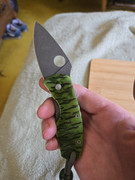
<a href='https://postimg.cc/kDQjt578' target='_blank'><img src='https://i.postimg.cc/kDQjt578/20250519-182218.jpg' border='0' alt='20250519-182218'/></a>
https://i.postimg.cc/XNhtmZh2/20250519-182218.jpg
<a href='https://postimg.cc/kDQjt578' target='_blank'><img src='https://i.postimg.cc/kDQjt578/20250519-182218.jpg' border='0' alt='20250519-182218'/></a>
Last edited by Psj78 on Mon May 19, 2025 4:38 pm, edited 3 times in total.
Spyderco and knife fanatic

Re: How to Post Pictures on the Forum
Try choosing option "hotlinks for forums"...
Top three going by pocket-time (update October 25):
- EDC: Endela SE (K390). Endela SE (VG10), Manix 2 LW (REX45)
- Mountains/outdoors: Pac.Salt 2 SE (LC200N), Salt 2 SE (LC200N), Pac.Salt 1 SE (H1)
- EDC: Endela SE (K390). Endela SE (VG10), Manix 2 LW (REX45)
- Mountains/outdoors: Pac.Salt 2 SE (LC200N), Salt 2 SE (LC200N), Pac.Salt 1 SE (H1)
Re: How to Post Pictures on the Forum
direct link and then inserting the {img} brackets is the best option.

Direct linking sends you right to the full sized image. Linking or hot linking,or copying the pre-coded image links, those are designed to make people click them to enlarge, get sent to the image host website and served ads.
Some image hosts make it a complete pain to get the direct link. imgur is terrible about that.
Direct linking sends you right to the full sized image. Linking or hot linking,or copying the pre-coded image links, those are designed to make people click them to enlarge, get sent to the image host website and served ads.
Some image hosts make it a complete pain to get the direct link. imgur is terrible about that.